
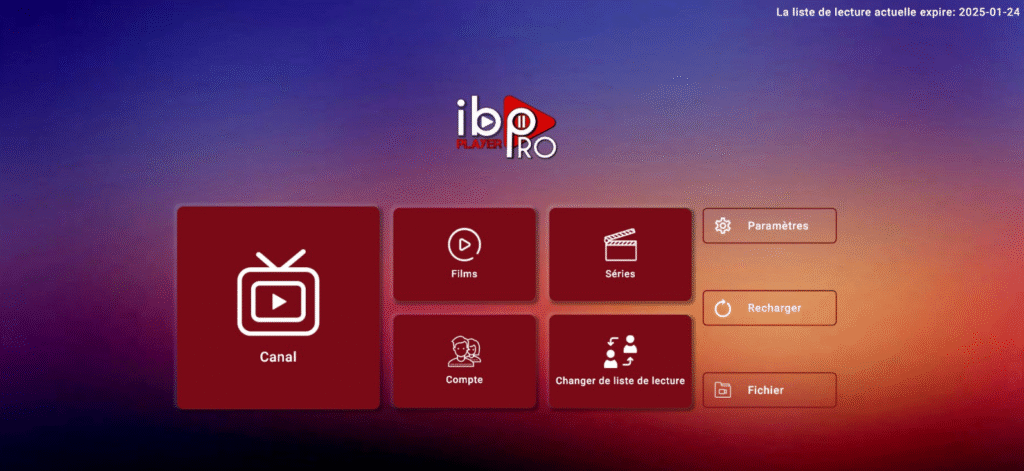
IBO Player, also known as IBO Pro Player, is a versatile and powerful media player designed to provide seamless streaming across multiple devices. Whether you have an Android TV, Firestick, smartphone, tablet, or other compatible devices, IBO Player allows you to watch live TV, movies, series, and other multimedia content in high quality. With its easy-to-use interface and advanced features, it has become one of the most popular IPTV players in 2026.
🎁 FREE TRIAL IPTV
Experience the best IPTV service with HD channels, movies, and sports. Get your 24-hour free trial and enjoy unlimited entertainment!
🚀 TRIAL NOWWhat Is IBO Player / IBO Pro Player?
IBO Player is not an IPTV service but a media player platform that allows you to organize and stream content from your existing IPTV subscriptions. It supports M3U playlists and other formats, making it compatible with almost all IPTV providers. Users can enjoy a smooth and customizable viewing experience without any hassle, and the player itself is lightweight, stable, and optimized for performance on all supported devices.
With IBO Player, users can manage multiple playlists, create favorite lists, and access EPG (Electronic Program Guide) features depending on their IPTV provider. It’s perfect for users who want to have a professional, cable-like TV experience at home, without the limitations of standard IPTV apps.
Key Features of IBO Player
IBO Player is packed with features that make it stand out from other media players:
- High-Definition Streaming: Watch your favorite channels and content in HD or even 4K resolution, depending on your IPTV subscription.
- M3U Playlist Support: Easily import and manage multiple IPTV playlists to access a wide range of channels and VOD content.
- Favorites Management: Quickly save and organize your most-watched channels for fast access.
- Customizable Interface: Change the layout, theme, and channel order to suit your preferences.
- Parental Controls: Restrict access to adult or inappropriate content to ensure a family-friendly viewing environment.
- Language Options: Choose your preferred language for menus and navigation.
- Cross-Device Compatibility: Works on Android TVs, Firesticks, smartphones, tablets, and other devices without performance issues.
- EPG Support: Access the Electronic Program Guide to see detailed channel schedules, program names, and times (depending on your playlist).
- Lightweight and Stable: Runs smoothly without consuming excessive system resources, even on older devices.
Subscription Plans
IBO Player offers a 7-day free trial, giving users the chance to explore all features before committing to a subscription. After the trial, there are multiple subscription options:
- 1-Year Subscription: Perfect for regular users who want uninterrupted access throughout the year.
- Lifetime Subscription: Ideal for users who prefer a one-time purchase for unlimited access without recurring fees.
The premium subscriptions unlock full features, including multiple playlist management, favorite channels, parental controls, EPG, and advanced interface customization.
Device Compatibility
IBO Player is designed to run smoothly on a wide variety of devices:
- Android TV and Android Boxes: Enjoy a cable-like experience with intuitive navigation and large-screen optimization.
- Fire TV Stick / Fire TV: Sideload the app easily and use it with your remote control for convenient TV navigation.
- Smartphones and Tablets: Stream your IPTV subscription on the go, anywhere with an internet connection.
- Other Android Devices: Compatible with older or newer Android-based systems without lag or crashes.
This extensive device support makes IBO Player one of the most flexible IPTV media players in 2026.
How to Install IBO Player
Installing IBO Player is simple and straightforward:
- Open the Google Play Store or your device’s app store.
- Search for IBO Player or IBO Pro Player.
- Download and install the app.
- Open the app and import your M3U playlist or IPTV login credentials.
- Customize your interface and start streaming instantly.
Video Tutorial: How to Install on Fire TV Stick and Android TV
Why Choose IBO Player?
IBO Player is ideal for anyone looking for a high-quality, customizable IPTV experience. It offers stability, easy navigation, and advanced features that make watching live TV and streaming content more enjoyable. Users who prefer to organize multiple playlists, manage favorite channels, and use parental controls will find IBO Player extremely convenient.
Additionally, IBO Player does not host any content, which makes it a safe and legal option when used with legitimate IPTV subscriptions.
Alternatives and Related Apps
If you are exploring other top IPTV players, consider:
- IPTV Smarters Pro: Another powerful Android-based IPTV player with multi-screen support.
- Smart STB App: Designed for set-top boxes with advanced IPTV features.
Frequently Asked Questions (FAQ)
- What devices support IBO Player?
IBO Player works on Android TVs, Firestick, smartphones, tablets, and other compatible devices. - Does IBO Player provide TV channels?
No. IBO Player does not include channels. You must add your own M3U playlists or IPTV subscription details. - Is IBO Player free?
IBO Player offers a 7-day free trial. After the trial, users can choose a 1-year subscription or a lifetime plan. - Can I customize the interface?
Yes. Users can change layouts, themes, and channel order for a personalized viewing experience. - Does IBO Player support parental controls?
Yes. You can restrict access to adult or inappropriate content. - Can I add multiple playlists?
Yes. IBO Player allows users to manage multiple playlists easily, so all IPTV subscriptions can be accessed in one place. - Is IBO Player safe to use?
Yes. The app is completely safe and legal to use when combined with legitimate IPTV playlists.
Pingback: Xtreme Player – Complete 2026 IPTV Setup Guide for Smart TV & Firestick
Pingback: Catch-Up on IBO Player (2026 Guide) – How It Works & How to Use It